Get help
Open the menu (top-left in the app), tap Help & Support, then Visit our website. This opens the Somos website in your browser, with more support options and a place for your input — the app itself sends nothing. You can also go straight to somosincontrol.com/somos-incontrol/support. Describe what you’re seeing — the more detail you include, the faster the developer can reproduce and fix it. Your device model, iOS version, speaker models and the app version (under About in the menu) are especially useful.Send the app’s log
When something went wrong, the log is worth more than a description. In the menu, tap Advanced Settings, then Submit diagnostics. The log comes up on screen first, in plain words, so you see what you would send. Details lists what you changed, like “Office: sleep timer → 30 min”, and marks a change the speaker refused. Tap Share to send it by mail, Messages or whatever you use, or Send to Somos (where Mail is set up) to send it to the developer. The log holds up to 10,000 lines of what the app did and what your speakers answered — action names, error codes, item ids — and never a password, a sign-in token or what you played. Send it soon after the problem; the log only keeps the recent past. It includes clearer iCloud failure reasons, refused group-volume retries and setup failures. Paired speakers keep their model names, and external group-volume changes are recorded even just after a change from Somos. Saved diagnostic filenames include seconds to distinguish repeated saves. If Somos closed on its own, the log also carries the newest crash reports iOS has handed Somos (see the app crashes).All fields in the contact form are optional. Leave the email field blank if you don’t need a reply — your feedback still reaches the developer and helps improve the app.
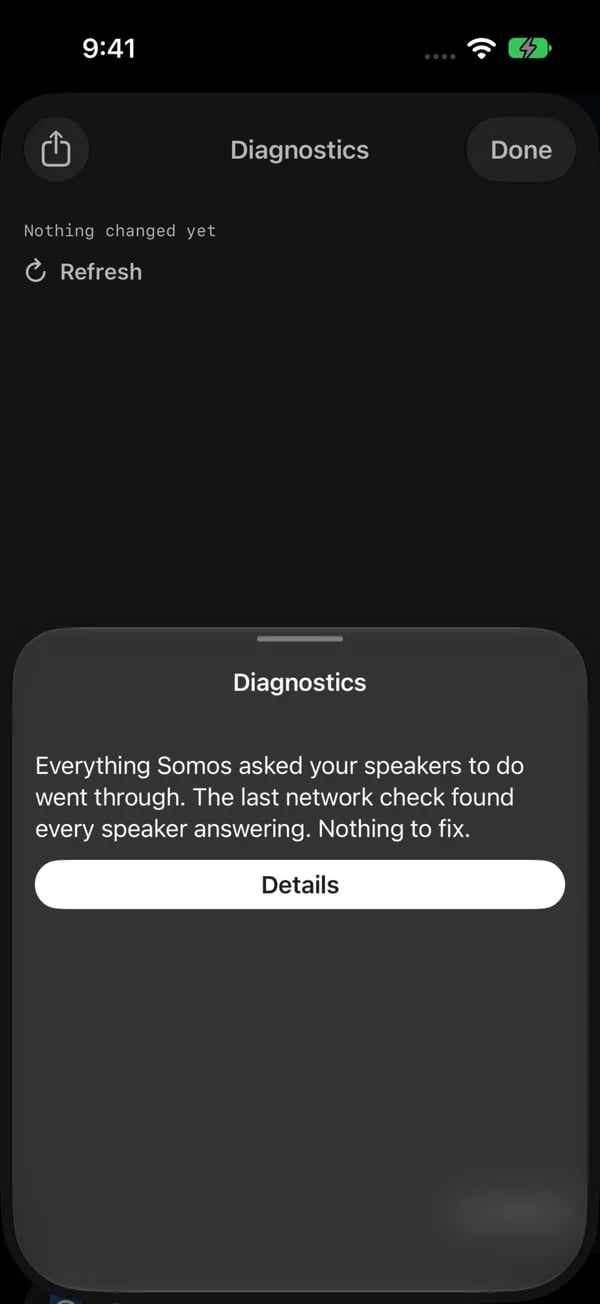
Submit diagnostics opens a readable summary first. Tap Details to see the log itself before you choose how to share it.
Suggest a feature
Somos InControl’s roadmap is shaped directly by what users ask for. Open the suggestions form, to add your idea to the list. Every submission is read and logged.Recently shipped features
Recently shipped features
These started as user suggestions and are now in the app:
- Support for all rooms, not just home theater — Build 25
- Stereo-pair balance slider — Build 26
- Single & mismatched surround speakers, surround and subwoofer level control — Build 28
- Music controls on the Lock Screen — Build 29.3
- Surround on/off toggle, create stereo pairs inside Somos, faster surround & fronts setup — Build 31
- Live slider updates, max volume limit per room, Music Playback (Ambient / Full) toggle, S1 + S2 split-system support — Build 32
- Mute from the volume card, favourite groups on the bottom bar, TV / Music as a real toggle, shuffle beside Play, battery level for portables, presets for music-only rooms, presets can save the volume, support for a second Sub — Build 34
- Presets: Night Sound, Speech Boost and Loudness are now optional ticks like Volume, and renaming a preset no longer re-saves its values; Speech Boost as a five-level slider on the Arc Ultra; identify tone (plus the light flash) when picking speakers in setup, with a switch to turn the tone off; Group Audio Delay for grouped soundbars; Status Light and Touch Controls per room — Build 35.7
- Music services (Apple Music, Amazon Music, Pandora, Spotify, iHeartRadio, TuneIn, Bandcamp) with browse, search and play to the room; Favorites from any service on their own page; add to queue with a plus on every song; pinch for volume and swipe the art to change songs (both off by default); the loaded preset stays highlighted; your three presets on the Lock Screen for a TV room; Submit diagnostics from the menu; the Apple Watch app — Build 36
- A ready-made watch face (menu → App → Apple Watch → Add Infograph face, or Add Modular Ultra face on an Ultra), plus Sleep Timer, Favourites, Presets, EQ Bars and EQ LEDs complications and a Rooms button on the Watch app — Build 38
- Sleep timer — Off, 15, 30, 45, 60 or 90 min, from the menu or the Apple Watch; keeps running with Somos closed — Build 38
- Hold a saved group, a room tab or a room on the wheel to rename, reorder, ungroup or remove it, and a Saved Groups wheel on the bottom bar — Build 38
- Add the playing song to a playlist, and hearts on every song in the queue, plus the ability to delete a preset — Build 38
- iCloud sync of presets, home names, room order, saved groups, favourites and playlists across iPhone and iPad — Build 38
- Grouped rooms use the group leader’s presets, a music speaker grouped with a TV soundbar now shows the TV input, and the Apple Watch shows and turns a group’s volume — Build 38
New in build 40
New in build 40
- Two pages for soundbar rooms (Home Theater and Music, with a Go to TV / Go to Music button), room symbols on the room tabs, and saved groups as bookmark tabs next to your rooms
- Alarms in the menu, and on the Apple Watch
- Playlist backup, with an optional backup to iCloud Drive
- A Shortcuts action and a widget button that set a room to an exact volume
- Network health in the menu, under Advanced Settings
- Submit diagnostics shows the log first, with plain-words Details
- On the Apple Watch: a Queue page, Shuffle and Repeat, Group and Ungroup, Surrounds, Sub, Status Light, Touch Controls and Speech Boost, presets you can save from the wrist, and a small Music or Home Theater page for each room
- Build 40.0.5: dark navy widgets, Lock Screen card and Dynamic Island; the Music page always shows your services; Somos Bookworm, the help chat; Submit diagnostics and Network health under Advanced Settings; new first-launch films; one tap on Speech Boost opens its levels on an Arc Ultra or Beam Ultra; a wide Now Playing card on the watch face; and a one-time offer to send the crash report after an unexpected close
- Build 40.0.9: the Music page has full-card album art, a slower full-width title and preset pills above its sound card. TV delay controls stay on Home Theater. Speaker Setup confirms fronts, Sub and surrounds in order and warns about silent Beam Ultra fronts. You can add alarms on the Watch, choose glass or navy for Live Activity, and replay or read the intro.
Still to come
Still to come
On the list, not yet started or in progress:
- Crossover changes that don’t stick on some hardware — the missing control was fixed in Build 35.7.4, so if the slider still doesn’t appear on your system, get in touch; the questionnaire is the best way to help
- Distance settings for surrounds
- System information view
- Carousel room picker instead of tabs
- Favourite groups as an editable list
Questionnaires and the poll on the website
A few specific issues are hard to reproduce without owning every Sonos® model, so the website has a short questionnaire for each. They are no longer in the app’s menu or offered as popups — the app’s own way to help is Submit diagnostics above — but the forms are still the best way to describe hardware the developer doesn’t own. Every question in each form is optional, including your email address. The app’s menu links to the site under Help & Support → Visit our website.Speech Boost won't change
How Speech Boost behaves on your specific soundbar — particularly the Arc Ultra, where it’s now a level slider — so the developer can confirm the recent fix worked.
Crossover won't change
For anyone with a Sub. If the crossover slider appears but changes don’t stick — or doesn’t appear at all — this captures the details needed to track down the cause.
A speaker or system didn't show up
If Somos InControl found some of your speakers but not all — or missed an entire S1 or S2 system — this helps narrow down whether it’s a network issue or something the app needs to handle differently.