What’s on the music page
Volume stays at the top. Below it, the page scrolls from the services and full player to the three preset pills, the sound card and Speakers in this room.Pinned volume
The room’s volume slider stays pinned at the top and collapses to a slim bar as you scroll, just like the room page.
Favorites and your music services
Favorites, Playlists and Queue sit above the music services. Swipe the service row sideways to see more services and Manage services. If none are set up, tap Add a music service. These rows scroll up with the page; you do not need to open a Tap to browse row first. When a cable is plugged into a speaker’s Line In, a Line In tile comes first (see Line In). The lit service is the one playing. See Music Services and Favorites & Queue.
The player
Album art fills the whole player card, with the title, artist and controls over it. Text and button contrast adapt to the cover. The song title has its own full-width line above the heart, plus and sound button, and long titles scroll slowly. You also get a progress bar you can drag, and Shuffle, Previous, Play/Pause, Next and Repeat. Play resumes the queue rather than just un-pausing. When what is playing came from one of your services, a heart and a plus sit below the title — keep it, or add it to the queue or one of your playlists. See Add the playing song to a playlist. A radio station shows the station’s name as the title and, underneath, what the station says is on right now. A title too long for the line scrolls instead of being cut off.
Go to TV
On a soundbar, Go to TV in the title bar takes you back to Home Theater. It changes the page you see. To send the bar back to its TV input, tap Back to TV when it is offered, or go to Home Theater and tap Switch to TV audio. See Home Theater.
Sound controls
Tap the orange sliders button on the full or mini player to open the controls in place. Tap again to close them. The sliders come first, with the switches at the bottom of the sound card. Controls follow the room’s hardware: bass, treble, Sub level, Balance, Height and Music Level where available. Sub and surround controls are still here for rooms that have them. See Sound & Trueplay.
Music presets
Three compact preset pills sit above the sound card, without a Sound Presets heading. These are separate from a soundbar’s TV presets. Tap to load; hold to save or rename. Long names scroll and stay visible between repeats. Every pill has a blue hand symbol below its name to remind you to hold it to save. See Sound Presets.
Speakers in this room
Below the sound card, tap Speakers in this room to open or close the speaker map. Press and hold the map to configure the room. See Room Diagram.
Queue
Tap Queue above the services to see what is coming up next. The current track is highlighted. Tap a track to jump to it, swipe left to remove it, or tap Clear to empty it (the app asks first). Search Queue filters the list. See Favorites & Queue.
The mini player and seek bar
Scroll down and the player shrinks to a mini player pinned just under volume. Previous, Play/Pause, Next, Shuffle, Repeat and sound stay within reach. Tap its art or title to return to the full player. Shuffle shows whether it is on; Repeat cycles through Off, All and This song. Both players show the same state. A radio station greys out controls it cannot use. For a seekable song, drag the full player’s progress bar and hold it where you want. The thumb and elapsed and remaining times follow your finger. Let go to play from that point. While the song plays, the thumb and times advance without shifting the player card. The Music sound keeps its rows in place while you scroll, even if more speaker settings finish loading. New rows appear once scrolling stops. Controls wait for a speaker reading before you can use them. A loading symbol may settle to a still hourglass while the read continues.Switches in the Music sound card
Open the sound card to reach Loudness, Trueplay, Surround Music (with surrounds), Status Light and Touch Controls, where the room supports them. They sit at the bottom of the sound card and close with it. A room with surrounds also has a Surrounds on/off switch here. It uses the same setting as Home Theater. TV Dialog Sync, TV Autoplay and Ungroup on Autoplay stay on Home Theater. The switch cards keep a shared height and grow for larger text. If the speaker refuses a change, the control returns to its confirmed setting. The reset button stays inside the open sound card and disappears when you close it.When the room is grouped
The music page of a grouped room shows who it is grouped with (for example Office grouped with Era Right S) and the Group slider under the room’s own volume, just like the room page. Its presets are the group leader’s. See Grouping Rooms.Browsing and playing
1
Tap a music service
The music page slides down out of the way, leaving a handle at the bottom that shows what is playing, and the service’s own page opens above it — its shelves, rows and stations, laid out the way the service asks.
2
Find something
Scroll the service’s page, open an album or a playlist in place, or use the Search field at the top — it searches with the service’s own categories (songs, albums, artists, playlists, stations, whatever that service offers) and the results replace the page until you clear the field.
3
Play it
Tap a song, album, playlist or station. It plays on the room, and the music page comes back up with the player and the queue. Tap the plus on a song instead to add it to the end of the queue without interrupting what is playing; tap the heart to keep it in your Favorites.
4
Go back and forth
The handle at the top of the raised page reads Back to browse (or Back to favorites) — tap it or pull it down to return to the service’s page. Pull the handle up to bring the player back. The handle is only there after you opened a service’s page yourself; when music was started elsewhere and the service simply lit up, the player has no handle to go back to. The back arrow in the top-left corner returns to the room page.
Music playing, and you come back into the app or switch to that room? You land on the music page, not the home theater page. It only opens by itself while music is actually playing — never for TV, never when paused.
Line In
Speakers with a Line In — Era 100, Era 300, Move 2 (with its USB-C adapter), Five, Amp, Port and Connect, for example — can play whatever you plug into them. While the speaker reports a cable in, a Line In tile appears first in the row of music services. Tap it and the room plays its Line In. The tile steps aside while that room is already playing Line In, and comes back if you pause it. Without a cable, the tile isn’t there. There is no Line In pill on the room page. While a room plays Line In, its source line reads Line In (and Bluetooth while it plays over Bluetooth). Either way the room is on its Music side, so the music presets and sound controls on this page are the ones you tune. See Your Rooms.Apple Music quality badges
For a song that came from Apple Music, small badges under the artist line say what Apple’s catalogue offers for that track — Lossless, Hi-Res Lossless, Dolby Atmos. This is what the track offers, not what the speaker is decoding at that moment. The same format shows in the room page header while the music plays, in every room, and on the Live Activity music card. For other music, the header shows the stream’s own format when it reports one, such as MP3, AAC or FLAC, the way a soundbar shows its TV audio. Somos asks for Apple Music permission the first time it needs this.Swipe the art to change songs
Off by default. Turn it on in the menu under App → Somos settings → Swipe art to change songs, then swipe the album art on the player right for the next song, left for the previous. See Gestures.Music-only surround controls
Rooms with surrounds get two extra controls that only apply to music, matching the Sonos® app’s music-surround settings:- Music Level — how loud the surround speakers play during music. Separate from the Surround level on the room page, which is for TV.
- Surround Music — a small tile with a switch between Ambient (left) and Full (right). Full plays the surrounds at full level for music; Ambient keeps them subtle. The tile only appears when surrounds are bonded to the room.
The Sonos® Favorites and Sonos® Playlists tiles from earlier builds are gone from the music page. Favorites in Somos are now your own (your playlists have a backup too) — anything you heart from a music service — and live on the Favorites page. The Apple Watch app still plays your Sonos® favorites.

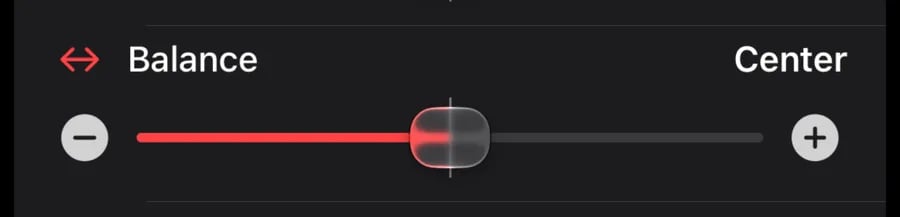
Top: Surround Music sets how the rear speakers play music, Ambient or Full. Bottom: a stereo pair has Balance on its music sound card; move it toward the left or right speaker, or back to Center.