What Live Activity shows
The card follows what the speaker is really doing — TV on the wire means the TV card, even if the music page is open in the app. The Lock Screen card uses clear glass by default. Turn Glass Live Activity off under Menu → App → Somos settings to use dark navy. The Dynamic Island keeps its system black background. Labels wrap and the music Play/Pause button is green:- TV (soundbar) mode
- Music mode
- The current volume percentage, large, beside the TV symbol and the room name with · TV
- The audio format as badges under the room name — DOLBY ATMOS and EARC, for example — when the soundbar reports them
- A volume slider with − and + buttons
- The room’s three sound presets by name, then Mute. The loaded preset is lit like the app’s picked buttons. Tap one to apply it; the room page follows at once if it is open. A room with no saved presets shows no preset chips.
- Mute is a grey button with a slashed speaker, reading Muted, while the room is muted
The Night Sound and Speech Boost chips from earlier builds are gone. Save them into a preset instead — a preset can carry Night Sound and Speech Boost — and switch between presets from the card. See Sound Presets.
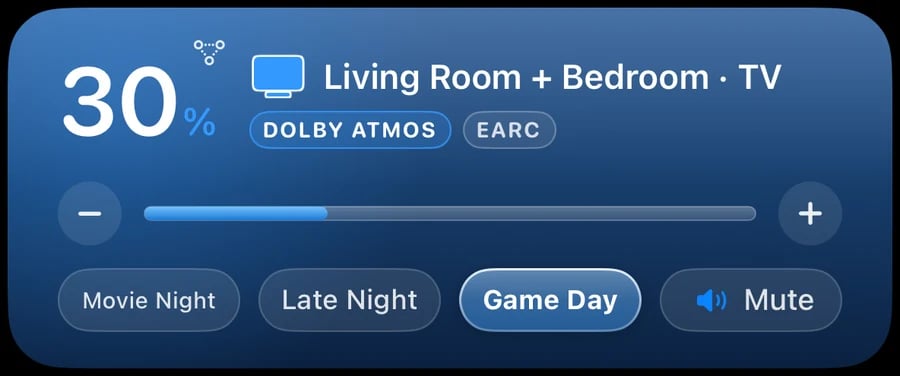
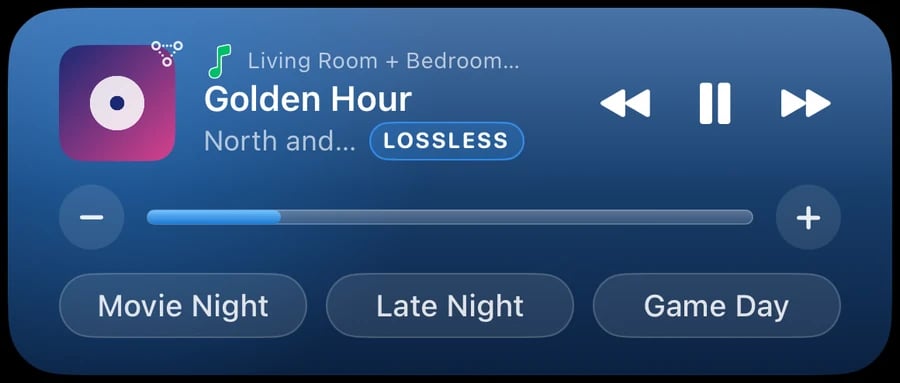

The Lock Screen card in build 40.0.2. Top: a TV room, with the volume, the room, the DOLBY ATMOS and EARC badges, the slider, the room's presets (Game Day picked) and Mute. Middle: a music room, with the album art, the song, the LOSSLESS badge, playback buttons and the slider. Bottom: the Dynamic Island's room line for TV and for music. Example data.
Enabling Live Activity
Live Activity is off by default.1
Open the menu
Tap the menu button in the top-left corner of the app.
2
Turn on the Live Activity switch
Tap App, then Somos settings, and switch Live Activity on. The card appears for the room you currently have open.
3
Allow Live Activities in iOS Settings if prompted
If iOS has Live Activities disabled for the app, an orange warning appears under the switch — tap it to jump to Settings → Apps → Somos InControl → Live Activities and turn them on.
4
Adjust from anywhere
Lock your phone. The card is on your Lock Screen and in the Dynamic Island — tap − or +, mute, switch presets, or skip tracks without unlocking.
Live Activity always reflects the currently selected room in the app. Switch rooms inside Somos InControl and the card switches with you. It ends when you quit the app, or about 30 minutes after you send the app to the background, so a stale card never sits on your Lock Screen. Open the app again to bring it back.