What every room gets
All rooms — single speakers, stereo pairs, portables and soundbar setups — share the same foundation:- Volume slider with − / + and mute
- Bass and treble sound, Loudness
- Subwoofer level, on/off, phase, and crossover (when a Sub is bonded and the speaker reports one)
- Three music presets on the music page
- Trueplay, Status Light and Touch Controls tiles
- The music page with your music services, favorites and the queue
- A room diagram, room grouping, and room rename
Home-theater-only controls
TV / Music source and the title-bar button
At the top of a soundbar’s page, the source row shows what the bar is doing — TV with its connection, or the music. The Go to Music button in the title bar opens the music page, and Go to TV brings you back. They change the page you are looking at, never the sound. While the bar plays music, a Switch to TV audio button on the now-playing line sends the soundbar back to its TV input — the same as pressing the input button on a remote. The source follows what the speaker is really doing, so music started elsewhere shows as music too.
Audio-format badge
Next to the source you’ll see the connection (HDMI ARC, eARC, Optical) and the format the soundbar is decoding right now — Dolby Atmos, Dolby Digital 5.1, DTS, PCM Stereo and so on. It updates in real time, so you can confirm your TV is actually sending what you expect. While Music is lit, the same spot scrolls the format the music service reports for the track (Lossless, Hi-Res Lossless, Dolby Atmos) when there is one.
Night Sound
Compresses the loudest moments — explosions, music peaks — so you can follow the action without waking anyone. Save it into a preset and it is one tap away on the Live Activity too.
Speech Boost
Lifts dialogue above effects and music. On most soundbars it’s an on/off tile; on the Arc Ultra it’s a five-step slider (Off, Low, Medium, High, Max — Medium is roughly the old “on”). If the speaker refuses the change, the switch goes back and the app tells you instead of pretending it worked.
Surround level and on/off
When surrounds are bonded: a Surround slider (−15 to +15) sets how loud the rears play for TV, and a Surrounds switch mutes them without unbonding. Music has its own Music Level slider and Surround Music tile (Ambient / Full) on the music page.
Height channel
Sets the level of the overhead (Atmos) channels (−10 to +10). Shown only where there is real height hardware — the Arc family’s up-firing drivers, the Beam (Gen 2), or Era 300 satellites — never on a Ray or Playbar.
Subwoofer
Level (−15 to +15), an on/off switch, Sub phase (Normal / Reversed — greyed out while Trueplay is on) and — where the speaker reports one — the crossover frequency (50–110 Hz). A second Sub, including two older-generation Subs, is supported. See Sub phase.
Group Audio Delay
Appears only while the soundbar is grouped with other rooms. Steps the delay applied to the other rooms so they don’t echo against the bar — the same setting as the Sonos® app’s Group Audio Delay.

The top of a soundbar room: the room you are controlling, its soundbar with a green connection dot, the audio format it is receiving, and the source (TV over eARC). Go to Music opens this room's music page.
Music speakers grouped with a soundbar
When a speaker that can’t play TV on its own, such as an Era or a One, is in a group the soundbar leads, its page shows the soundbar’s TV input: the TV row with the connection and audio format, and the TV and Music buttons. Those buttons act on the soundbar. Your TV remote still changes only the soundbar’s volume; use the Group slider to move every room together. See Grouping Rooms.Two pages for a soundbar room
A soundbar room has two pages. The room opens on what is playing: the Home Theater page for TV, the Music page for music. The Go to TV / Go to Music button in the title bar switches between them. On Music, the three music preset pills come before the sound card, followed by Speakers in this room. The mini player pins below volume as you scroll. Its sound button opens or closes the controls in place. Switching pages does not change the sound. The sound you hear while music plays is music, so music’s presets and sound live on the music page. A room without a soundbar works this way all the time: its presets and sound are always on the music page, and its room page keeps volume, Balance, the Sub’s switch, crossover and phase, and the three switches.TV Dialog Sync
On Home Theater, TV Dialog Sync has a stepper for choosing the delay while you watch dialogue. It stays on Home Theater and does not appear in the Music sound card. TV Autoplay and Ungroup on Autoplay stay on Home Theater. Group Audio Delay is a separate setting for lining up other rooms with a grouped soundbar.Building the home theater
Press and hold the room diagram on a soundbar’s page to open Home Theater Setup, where you assign speakers to Front Left, Front Right, Surround Left, Surround Right, Subwoofer and Subwoofer 2 — including separate front speakers, which the official app doesn’t offer. The picker explains compatibility when you choose speakers. Somos lets the soundbar decide whether it accepts a model. Setup adds and confirms fronts first, then Sub, then surrounds. On Beam Ultra, a warning explains that added fronts stay silent while the bar keeps the front and height channels. See Speaker Setup for the full walkthrough.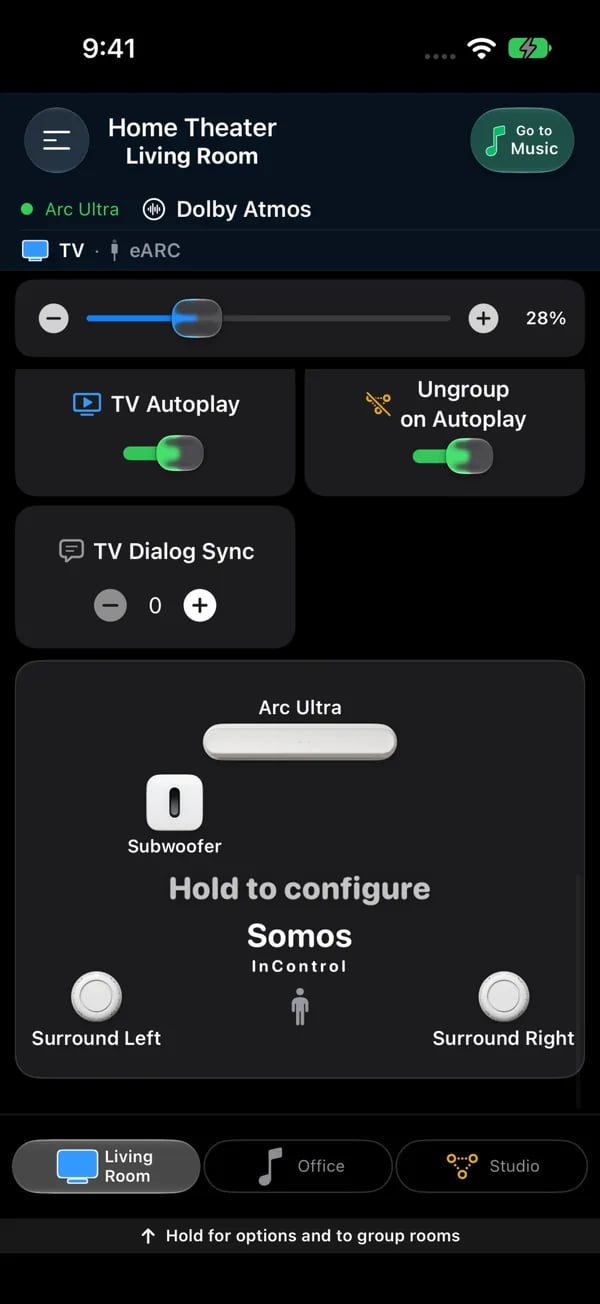
Further down a soundbar room: TV Autoplay, Ungroup on Autoplay, TV Dialog Sync (minus and plus, one step at a time while you watch dialogue), and the room diagram with the soundbar, Sub and surrounds. Hold the diagram to open Home Theater Setup.
Subwoofer in non-soundbar rooms
The subwoofer controls are not exclusive to home theater rooms. They appear in any room that has a Sub bonded — including stereo pairs and single-speaker rooms: the Sub level on the music page, and the on/off switch, crossover and Sub phase on the room page. Bonding a Sub does not turn the room into a TV room. A Sub that isn’t bonded to anything gets its own page explaining that there’s nothing to control until you bond it to a soundbar or stereo pair.